The $0 VPS in your drawer: turn your old laptop into a remote Claude agent
A travel-friendly setup I built on a recent trip to the Maasai Mara.
TL;DR
I had an old HP laptop sitting in a drawer — i7–6500U, 8 GB RAM, 1 TB disk. I had a cheap DigitalOcean droplet running at the smallest tier (1 GB RAM, 1 vCPU, 25 GB disk) — about $6/month, so ~$72/year, doing not very much. The laptop has 8× the RAM and arguably more CPU. I’d been paying for worse hardware.
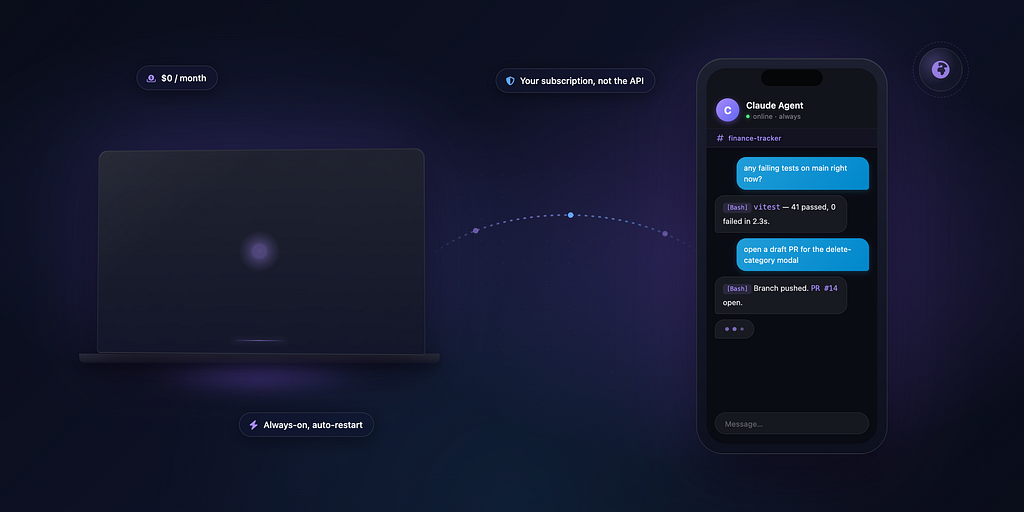
I travel a lot, and this is the build that flipped that around. Started it on a trip to the Maasai Mara for my birthday — the kind of place where you have a few hours between game drives and questionable wifi but you still want to poke at your projects. The laptop is now an always-on Claude agent I can talk to from my phone via a Telegram chat, from anywhere in the world. It costs me $0/month. The Claude usage runs on the Pro subscription I already pay for — not an API key, not a per-token bill.
A real exchange:
me:        on the finance tracker, are there any failing tests on main?
agent:     [tool: Bash] git status clean, on main. Running vitest…
           41 passed, 0 failed in 2.3s.
me:        cool. the last commit fixed the edit modal close-on-save on the
           transactions page. is the same pattern missing on add.html?
agent:     [tool: Read] No — public/add.html uses an inline form, no modal.
           The pattern doesn't apply there.
me:        ok. open a draft PR to add a "delete category" confirmation modal —
           categories.html currently nukes on a single click
agent:     [tool: Bash] Branch ui/category-delete-confirm created. Wrote the
           modal matching the dark-theme patterns in public/css/dark.css.
           Wired up public/js/api.js. Tests still 41/41 green. Pushed.
           PR: github.com/…/cf-finance-tracker/pull/14
me:        love it, thanks
Two minutes of Telegram between sundowners. A small feature PR ready to review when I’m next at a keyboard.
This post is the high-level version — what’s possible, why it works, the rough shape of the build. A follow-up will go deeper on using the same laptop as a portable dev environment.
Why this finally works in 2026
Three things landed in the last 18 months that turned this from “fragile DIY project” into “Saturday afternoon build”:
1. Claude Code has a real headless mode.
Run `claude setup-token` once and you get a long-lived OAuth token (`CLAUDE_CODE_OAUTH_TOKEN`). Drop it into an env var on a server. Every subsequent `claude -p “prompt”` runs non-interactively, billed against your subscription, not the API. That’s the difference between $0/month marginal cost and a $1 surprise every time you ask for help with `grep`.
2. The Claude Agent SDK.
Anthropic shipped a Python (and Node, .NET, Rust) SDK that wraps the Claude Code CLI as a subprocess. You get `ClaudeSDKClient` — a streaming, multi-turn, tool-using agent with its own working directory and session ID. You can run several in parallel. Each one is a real Claude Code session, with the same tools you’d get at the terminal: `Bash`, `Read`, `Write`, `Edit`, `WebFetch`.
3. Tailscale.
Zero-config encrypted private network. Your laptop gets a stable hostname like `home-computer.tail2ca3622.ts.net`, reachable from any device you’ve signed into the same Tailscale account. No port forwarding. No dynamic DNS. No exposed services on the public internet. SSH “just works” — including from a coffee shop with sketchy wifi.
The fourth thing — and this is the unsexy one that makes the whole UX click — is Telegram Topics: forum-style threads inside a single group. Each Topic gets its own session, its own working directory, its own conversation history. New Topic = new clean Claude. It’s the difference between a chatbot and a usable agent surface.
What you end up with
- A laptop you can close the lid on and stash in a drawer.
- A Telegram supergroup where you DM a bot. Each Topic = an independent Claude session.
- Full shell access to the laptop, via Claude, via Telegram. From anywhere.
- Persistent working directories per session — files Claude creates stick around.
- Auto-restart on crash, auto-start on boot.
- Zero monthly bill, beyond the Pro subscription you already have.
Memory footprint, in case you’re wondering: the bot itself uses about 80 MB. Each active Claude session uses ~200 MB. With 8 GB RAM, you can comfortably run 20+ parallel topics before pressure.
The architecture
[your phone]
    │
    ▼ Telegram message
[Telegram servers]
    │
    ▼ Bot API (long-polling)
[your old laptop, somewhere with power + wifi]
    ├── python bot (claude-agent-sdk + python-telegram-bot)
    │   └── one ClaudeSDKClient per (chat_id, message_thread_id)
    └── tailscaled (for your own SSH access)

your Mac/iPad/borrowed-laptop
    │
    ▼ Tailscale + SSH (admin only — Telegram is the everyday interface)
[your old laptop]
A message lands in Telegram → bot looks up the (group, topic) pair → if it’s a new pair, spawns a fresh `claude` subprocess in an isolated working directory → forwards the message → streams the reply back to Telegram.
The 30-minute build
I’ll keep the recipe high-level here.
1. Prep the laptop (5–60 minutes depending on starting state).
If it’s dual-booted with Windows, wipe Windows. If it’s a fresh install, install Ubuntu Server (no GUI — saves a few GB of RAM you’ll want for Claude sessions). The OS itself doesn’t matter much; anything Debian-flavored works fine. If you’re keeping an existing Ubuntu install, just confirm `systemctl set-default multi-user.target` puts you in text-mode at boot.
2. Tailscale on both ends (5 minutes).
curl -fsSL https://tailscale.com/install.sh | sh
sudo tailscale up --ssh
The ` — ssh` flag enables Tailscale SSH, which means you can `ssh jack@home-computer` from any other Tailscale-connected device with no SSH key dance. Install Tailscale on your Mac/phone too, sign in with the same account.
3. Claude Code headless (5 minutes).
curl -fsSL https://claude.ai/install.sh | bash
claude setup-token       # prints a URL — open it in any browser, sign in with your
                         # Pro/Max account, get a code, paste it back
                         # The terminal prints a sk-ant-oat01-... token. Save it.
export CLAUDE_CODE_OAUTH_TOKEN=<that token>
unset ANTHROPIC_API_KEY  # critical — API key takes priority over subscription if set
claude -p "say hi"       # confirms subscription billing is working
The OAuth token is good for a year and respects your Pro/Max subscription limits — no API charges.
4. The bot (10 minutes).
Two libraries, both pip-installable: `python-telegram-bot` and `claude-agent-sdk`. The Python you need is ~150 lines:
- Allowlist on `update.effective_user.id` (so only you can use it).
- A dict keyed on `(chat_id, message_thread_id)` mapping to a persistent `ClaudeSDKClient` per Telegram Topic.
- On each message: send a typing indicator, forward to Claude, stream `AssistantMessage` blocks back to Telegram, chunk replies under the 4096-char limit.
- Two commands: `/new` resets the current Topic’s session, `/status` lists active sessions.
- `permission_mode=”bypassPermissions”` if you trust yourself fully (single-user bot; tools run without prompting). If you’re more cautious, use `”acceptEdits”` or write a permission callback.
Talk to @BotFather on Telegram to register the bot and get its token. Two extra commands there matter: `/setprivacy` → Disable (lets the bot see all group messages, not just `/` commands), and `/setjoingroups` → Enable.
Then create a private supergroup, add your bot as admin, enable Topics in the group settings. That’s it for the Telegram side.
5. Make it survive reboots (5 minutes).
loginctl enable-linger $USER # user services start at boot without you logging in
Drop a tiny systemd user unit at `~/.config/systemd/user/claude-bot.service` with `ExecStart=…/run.sh` and `Restart=always`. Enable it. Done — the bot now boots with the laptop and auto-recovers from crashes.
Caveats worth knowing
Subscription terms. Anthropic states OAuth subscription auth is intended for “ordinary individual use of Claude Code and other native Anthropic apps.” A bot you use *yourself* is the gray-area-but-fine read most people take. If you start sharing it with strangers or running heavy automation, you’re past that line. Be sensible.
Your laptop’s disk is probably older than you think. Run `sudo smartctl -A /dev/sda` before you commit to this; pay attention to `Current_Pending_Sector` and `Reallocated_Sector_Ct`. If either is non-zero and trending up, replace the disk with a $40 SATA SSD before investing further. Mine had 240 pending sectors when I started — the OS itself had been quietly corrupting before I noticed.
Power loss is on you. Most consumer laptops don’t have a “Power on after AC loss” BIOS setting. Either keep the battery healthy (it’s your built-in UPS) or add a cheap external UPS. Otherwise an outage kills the bot until you physically press the power button.
YOLO mode is YOLO mode. `permission_mode=”bypassPermissions”` lets Claude run any shell command without asking. That’s the point — it’s why the bot is useful — but it means whoever can message that bot can do anything your user can do. The allowlist is your only fence. Treat the Telegram bot token like a production credential, because in effect, it is one.
What I actually use it for
A non-exhaustive list of things that have been genuinely useful so far:
- Async coding on my own projects. I have a few side projects on the go — a finance tracker on Cloudflare Workers, FarmTours, RemoteFarm. From a phone I can ask the agent to read a file, run the test suite, draft a small feature on a branch, push a PR. It’s not a replacement for sitting down at a real machine, but it’s incredible for the 80% of tasks that are smaller than that.
- Bug capture while I’m out and about. “Add a TODO to the finance-tracker repo: review chip should re-appear when a flagged transaction is restored to needs_review. Open a draft issue.” Done in 30 seconds, gone from my head.
- Quick reference questions without breaking out of whatever I’m doing on my phone.
- Maintenance and housekeeping of the laptop itself: cleaning up old Downloads, checking what’s running, peeking at journal errors.
The mental model that’s clicked for me: it’s a second brain that happens to have a shell. Not a chatbot. Not a copilot. Something between an SSH session and a colleague you can leave tasks with.
Coming next
The follow-up post will be about using the same laptop as a portable dev environment — coding from a phone, an iPad or a borrowed machine with nothing but a browser, all backed by the always-on agent.
Hardware in this build: an HP Notebook from ~2015, Intel i7–6500U, 8 GB RAM, Ubuntu 20.04 + free Ubuntu Pro for ESM. Total monthly cost: $0 — the laptop was sunk cost, Tailscale is free for personal use, and the Claude usage runs on the Pro subscription I was already paying for. The DigitalOcean droplet I used to lean on can quietly get cancelled.
Originally published on Medium